
Delete Used Cars
Delete a confirmed garage range one car at a time; the game selects the next car automatically.
Prepare your garage
Make sure the deletion path contains only cars you want to delete. The tool starts from the car currently being viewed and deletes toward newer cars, one by one — it can't skip specific ones.
Sort, and stop on your starting car
Set the garage sort to Newest first, then go to the oldest car you want to start from. For example, with 12 cars, navigate to the 12th and leave the screen viewing that car.
Open Delete Cars & set the range
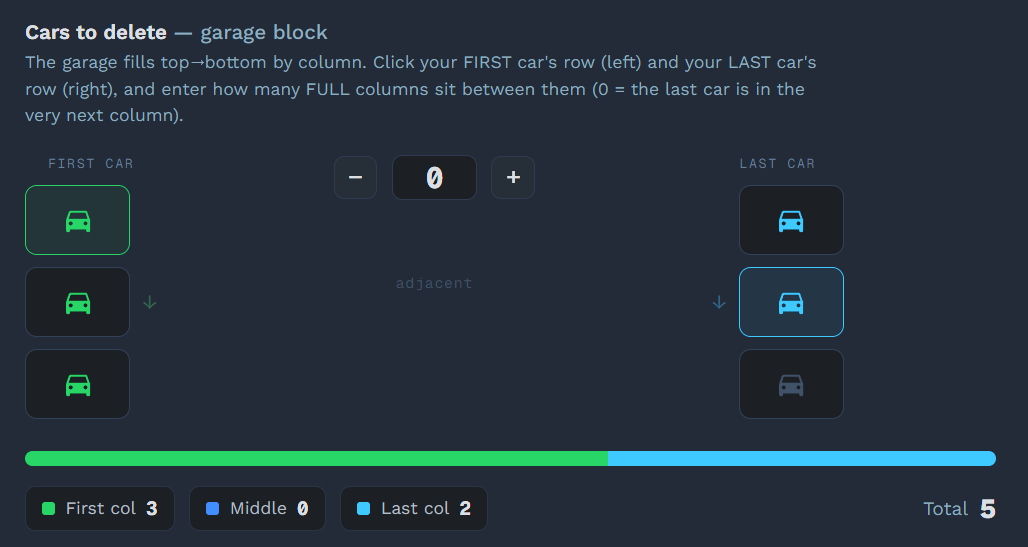
Click Delete Cars in the sidebar and use the garage block to pick the contiguous range of cars to delete (first row, middle full columns, last row) — the grid shows the total count. Then tick the "I understand all cars between the first and last car will be deleted" box to enable Start.
Press Start
Click ▶ Start or press F9. The countdown is 3 seconds; with background mode enabled, you don't need to switch back to Forza.
Fully automatic
The tool presses: Enter → Down ×4 → Enter → Down ×1 → Enter. After each deletion the game selects the next car automatically.
Stop
Press F9 or click ■ Stop at any time.